How letRetro Saves Engineering Teams Hours Every Sprint
See where retro time actually goes, and how letRetro cuts the scribe work, follow-up meetings, and ticket copy-paste. Compared against Miro, TeamRetro, and more.
Introduction
Most retrospectives don’t fail due to a lack of conversation. Usually, it’s quite the opposite.
People have a lot to say. The real issue starts when the talking ends.
Someone has to jot down notes. Someone else has to convert those notes into clear action items. There’s also the decision on who owns each task. And eventually, someone has to create the actual tickets in Jira or GitHub.
Sometimes that’s done right after the retro. Other times, it gets pushed to the next day. Or it just doesn’t happen at all.
The retro might only be 45 minutes long, but that's just part of it. A surprising amount of time is spent on all the stuff surrounding the meeting.
That’s where letRetro steps in.
The retro you see vs. the retro you actually pay for
Take, for example, an 8-person engineering team holding a 45-minute sprint retrospective.
On the calendar, it’s just 45 minutes. But there's way more work involved than it appears.
Before the call, someone prepares the board, checks the previous sprint's action items, and ensures everyone who needs to attend is there.
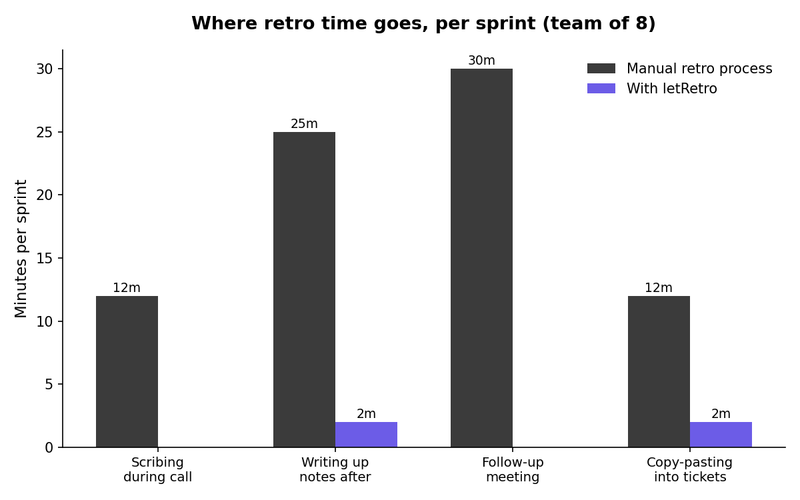
During the call, one person usually takes on the note-taker role. They’re listening but also trying to capture everything said. It’s tough to do both well.
After the call, those notes need organization. Someone sorts through them, groups similar points, writes a summary, and shares it out.
A few days later, another Slack conversation or a quick meeting happens to figure out which points become action items and who takes responsibility.
Finally, someone has to create those tasks in Jira or GitHub. That likely means copying details from the retro board, writing descriptions, assigning tasks, and linking everything back to the sprint.
None of this shows up on the calendar as "retro work."
Instead, it’s a Slack message late on Thursday, a half-finished task on Friday, or an action item no one remembers by the next retro.
For an 8-person team, this can amount to about 90 minutes of extra work on top of that 45-minute meeting.
Your retros, without opening another tab.
Here's the thing nobody talks about when they pitch you a "faster" retro tool: it still makes you leave where you're working to go use it.
You're heads-down in your editor. A teammate asks in standup what came out of last sprint's retro. Now you're opening a browser, logging into another app, hunting through old boards, just to answer a question that should've taken five seconds.
letRetro skips that step entirely. With the official MCP server, any AI coding assistant, Claude Code, Cursor, whatever you already have open, can pull retro data directly. Setup is one line:
npx @letretro/mcp installIt detects whichever AI tools you have installed, asks for your LetRetro API key, and wires up the config for you. No manual JSON editing.
From there, you just ask. Type something like @letretro/mcp show my latest retrospective into your assistant, and it pulls the board, the summary, and the open action items right into your conversation. No tab-switching, no searching, no "let me check and get back to you."
For a team that already lives in AI-assisted tools, that's not a nice-to-have. It's one less reason to ever leave your terminal.
Retro docs that write themselves
Most retro tools end at the board. Someone still has to turn that board into something the rest of the org can actually find later, a doc in Confluence, a page in Notion, something a teammate on another team can read in October and understand what happened in June.
That's usually manual. Someone exports notes, reformats them, pastes them into whatever tool the company standardizes on, and hopes they remember to do it again next sprint.
letRetro auto-generates the documentation and syncs it directly to Confluence and Notion, action items, decisions, and next steps included, without anyone touching a doc editor. The retro produces its own record the moment it ends, not three days later when someone finally gets around to writing it up.
All of that, the MCP access, the auto-synced docs, kicks in once the retro is already over. It's real time back, but it's back-end time back.
The bigger drain usually starts earlier than that. It starts the moment the call begins, when someone has to choose between actually being part of the conversation and writing it down. No integration fixes that from the outside. It has to happen live, on the board itself, while people are still talking.
That's the part worth looking at first.
The problem isn’t really the retro itself.
It’s everything that happens after the talking stops.
Someone has to take notes.
In almost every retro, one person ends up typing while the rest are engaged in conversation.
It sounds harmless, yet it means that one person isn’t fully part of the discussion. And because they’re trying to write everything down on the fly, the notes often lack clarity or completeness compared to the actual talk.
There are some key differences to highlight.
| Tool | Built specifically for retros | Auto-drafted action items | One-click ticket creation | Pricing |
|---|---|---|---|---|
| letRetro | Yes | Yes | Yes(Jira, GitHub) | $15/mo flat, 200 pooled seats |
| Miro | No, general whiteboard | No | No | $8/member/mo |
| TeamRetro | Yes | Limited | Limited | $20.83/mo |
| EasyRetro | Yes, basic board | No | No | $21/mo |
| GoRetro | Yes, broader sprint suite | Limited | Limited | $29/team/mo |
| Parabol | Yes, broader agile suite | Limited | Yes | $8/active user/mo |
Miro shines in brainstorming, workshops, and collaborative whiteboarding. But retrospectives? Not its strong suit. It won’t group retro feedback on its own or move you from a discussion point to a tracked ticket. Much of the follow-up? Manual.
TeamRetro and GoRetro provide more structure for retrospectives, going beyond just a blank board. Still, some action item tracking and ticket creation can need manual work.
EasyRetro keeps it simple, perfect for teams wanting just a basic retrospective board. But it lacks the automation others might offer, helping to organize discussion yet still making follow-up work necessary.
That’s a trend with many alternatives: they assist in running retros, but the subsequent work? Still a manual task.
Pricing is important too.
There’s another aspect teams often miss: how scaling pricing works.
Most retrospective tools charge based on user count. So, as your team grows, the cost climbs.
LetRetro offers a flat $15/month for up to 200 pooled seats.
For a team of 10, this can mean saving about $65–80 monthly compared to tools like TeamRetro or EasyRetro.
And that’s not even factoring in the time saved from steering clear of manual summaries, follow-ups, and ticket setups.
Typically, adding AI means shelling out more cash.
Here, it’s a bit different: the AI specifically aims to cut down on repetitive tasks. That means potential savings on both time and costs align perfectly.
Try it on your next sprint
If your last retro ended with a list of good ideas and no tickets to show for it, that's the gap letRetro is built to close. Start free, run one retro, and check the AI summary against how long it would've taken you to write it yourself.
About the author

Marketing @letRetro
Yasar is a marketer at letRetro, passionate about understanding users and crafting ideas that help the product stand out. He thrives at the intersection of creativity, community, and growth. Beyond work, he’s the team’s masked man, always looking out for his own health and making sure the team’s health comes first too. With a mix of good energy and good habits, he brings a thoughtful balance to the team.
View all articles